

Threat hunting proactively searches an organisation’s environment for hidden attacker activity that automated security controls may miss. It uses hypotheses, telemetry, cyber threat intelligence, and attacker behaviour to uncover suspicious activity before it becomes a confirmed breach. This guide covers threat hunting techniques, processes, tools, and best practices.
Table of Contents
Key Takeaways
- Threat hunting is a proactive investigation of endpoints, identities, networks, and cloud environments to uncover attacker activity that may have escaped automated detection.
- Threat hunters use different approaches depending on the trigger, including hypothesis-driven, intelligence-led, IOA-based, analytics-driven, and situational hunting.
- A threat hunt moves from a defined hypothesis to evidence collection, analysis, validation, response, and detection engineering. The findings should improve the organisation’s ability to detect the same behaviour in the future.
- Practical hunts can uncover threats such as living-off-the-land binary abuse, malicious OAuth consent grants, and anomalous cloud IAM activity by correlating multiple signals rather than relying on a single IOC.
- Effective threat hunting combines SIEM, EDR/XDR, UEBA, threat intelligence, and specialised tools with skilled analysts, regular hunting, and a strong understanding of the organisation’s normal environment.
What Is Threat Hunting In Cybersecurity?
Threat hunting is the proactive, human-led process of searching an organisation’s systems, networks, endpoints, identities, and cloud environments for hidden or ongoing malicious activity that automated security controls may not detect. Instead of waiting for alerts, threat hunters use hypotheses, telemetry, threat intelligence, and attacker behaviours to uncover suspicious activity and determine whether a threat is present.
Key Terminology: IOC, IOA, TTP, and Dwell Time
Threat hunters rely on a few core terms to describe what they are looking for, how attackers operate, and how long they remain undetected. Understanding these concepts helps connect threat intelligence with actual hunting activity.
- IOC (Indicator of Compromise): A technical artefact that may indicate a security compromise, such as a malicious IP address, domain, file hash, or suspicious file.
- IOA (Indicator of Attack): A sign of potentially malicious activity based on attacker behaviour, such as an unusual PowerShell command or suspicious privilege escalation attempt.
- TTP (Tactics, Techniques, and Procedures): The methods attackers use to achieve their objectives, covering the broader tactic, specific technique, and detailed procedure involved.
- Dwell Time: The period an attacker remains inside an environment between gaining access and being detected or removed. Reducing dwell time limits the opportunity for further compromise.
Threat Hunting Vs Threat Detection Vs Threat Intelligence
Threat detection looks for suspicious activity, threat intelligence explains known threats and attacker behaviour, and threat hunting actively searches for threats that may have bypassed existing security controls.
The key differences are:
| Aspect | Threat Hunting | Threat Detection | Threat Intelligence |
| Purpose | Find hidden threats | Identify suspicious activity | Understand threats and attackers |
| Approach | Proactive investigation | Alert-driven monitoring | Intelligence-driven analysis |
| Focus | Undetected attacker activity | Known suspicious patterns | Threat actors, IOCs and TTPs |
| Outcome | New findings and detection opportunities | Alerts for investigation | Context for hunting and response |
Why Is Threat Hunting Important For Organisations Today?
Threat hunting helps organisations find threats that may be missed by automated security tools. By actively searching for suspicious activity, security teams can identify compromises earlier, reduce attacker dwell time, limit potential damage, and improve detection capabilities over time.
1. Reduction In Attacker Dwell Time
Threat hunting helps identify attackers before they remain undetected for long periods. Earlier discovery can prevent attackers from moving across systems, escalating privileges, or accessing sensitive data.
2. Detection Of Threats That Bypass Automated Tools
Not every attack triggers an alert. Threat hunters investigate unusual behaviours, weak signals, and attacker techniques that may bypass signature- or rule-based detection.
3. Lower Breach Impact And Response Cost
Finding an intrusion earlier gives security teams more time to contain it. This can reduce the number of affected systems, limit data exposure, and simplify recovery.
4. Stronger Detection Coverage Over Time
A hunt can reveal gaps in existing security controls. Teams can use those findings to create new detection rules and analytics, making similar threats easier to detect in the future.
What Are The Different Types Of Threat Hunting?
Threat hunting can be classified by how the hunt is initiated and what drives the investigation. The three common approaches are structured hunting, unstructured hunting, and situational or entity-driven hunting.
1. Structured Hunting
Structured hunting follows a predefined hypothesis based on known attacker behaviours, such as MITRE ATT&CK techniques. Hunters systematically examine relevant telemetry to identify evidence of that activity.
2. Unstructured Hunting
Unstructured hunting starts with an anomaly, unusual pattern, or analyst intuition rather than a predefined hypothesis. The hunter explores available data to determine whether the activity indicates a potential threat.
3. Situational Or Entity-Driven Hunting
This approach focuses on a specific situation, asset, user, or entity considered high-risk. For example, a hunter may investigate an administrator account after detecting unusual login activity or examine a critical server following a security alert.
What Are The Core Threat Hunting Techniques And Methodologies?
Threat hunting methodologies differ mainly in what triggers the investigation and what evidence the hunter follows. Some hunts test a specific attacker technique, while others search for known indicators, behavioural patterns, or anomalies across endpoint, identity, network, and cloud telemetry.
1. Hypothesis-Driven Hunting
The hunter starts with a specific, testable assumption about attacker activity. For example, “An attacker may be using PowerShell to download and execute a payload” can be tested by examining PowerShell logs, parent-child processes, command lines, and outbound connections.
2. Intelligence-Driven Hunting Using IOCs
This method searches internal telemetry for known indicators linked to a threat campaign, such as file hashes, domains, IP addresses, or URLs. A match is then investigated across endpoints, DNS, proxy, firewall, and authentication logs to determine whether the indicator represents actual compromise.
3. IOA-Based Hunting With MITRE ATT&CK
Instead of depending on a fixed hash or IP address, hunters look for behaviours associated with an attack technique. For example, unusual credential dumping activity can be mapped to the relevant MITRE ATT&CK technique and investigated across process, authentication, and endpoint telemetry.
4. Analytics And Machine Learning-Driven Hunting
These hunts use behavioural analytics to identify activity that deviates from an established baseline. Examples include a service account accessing an unusual number of systems, a user authenticating from an abnormal location, or a workload making an unexpected external connection.
5. Hybrid And Custom Hunting
Hybrid hunting combines indicators, attacker behaviours, intelligence, and environment-specific context. A hunter might use a threat report to identify an attacker’s TTP, search for related IOCs, and then investigate affected endpoints and identities to establish the full scope of activity.
How Does The Threat Hunting Process Work Step By Step?
A threat hunt starts by defining what suspicious activity you want to prove or disprove, then uses security telemetry to investigate that activity. The hunter validates evidence, determines whether it represents malicious behaviour, responds if required, and feeds the findings back into detection controls.
Step 1: Trigger And Hypothesis
The hunt begins with something worth investigating: a threat intelligence report, a newly observed attacker TTP, an unusual authentication pattern, or a gap identified during a previous incident. The hunter converts this trigger into a specific hypothesis, such as: “An attacker may be using a compromised account to access internal systems outside its normal working pattern.”
Step 2: Investigation And Analysis
The hunter identifies the telemetry needed to test the hypothesis and searches it for supporting or contradictory evidence. This can involve correlating authentication logs, endpoint processes, DNS requests, network connections, cloud activity, and user behaviour to reconstruct what happened and identify related activity.
Step 3: Resolution And Response
If the evidence confirms malicious activity, the hunt shifts from discovery to containment and incident response. The team identifies affected users, endpoints, accounts, and other assets, then takes actions such as isolating a device, disabling an account, blocking an indicator, or removing attacker persistence. For more complex incidents, the investigation may also require Digital Forensics to examine affected systems, preserve evidence, and establish how the activity occurred.
Step 4: Documentation And Detection Engineering
The hunter documents the query logic, evidence, affected assets, attacker behaviour, and conclusion. If the activity is confirmed as malicious, the investigation is converted into a repeatable detection using SIEM rules, EDR analytics, Sigma rules, YARA rules, or other applicable controls.
The Feedback Loop: From Hunt Findings To Continuous Detection
A completed hunt should leave the security team with something actionable. Confirmed attacker behaviour can be converted into detection rules, while gaps discovered during the hunt can lead to better telemetry, new data sources, or revised queries. Over time, this turns individual hunts into continuously improving detection coverage.
This feedback loop becomes more useful when threat intelligence can be applied to security data collected across the environment. For example, when a new IOC is linked to a threat campaign, security teams can investigate whether related activity appears in their available telemetry and determine which systems, users, or other assets may be affected. Eventus Security brings security data and threat intelligence together through its Security Data Lake and Threat Intelligence Platform, giving analysts the context needed to investigate indicators and connect related activity during a threat hunt.
What Does A Real Threat Hunt Look Like In Practice?
A real threat hunt follows a specific behaviour from the initial signal through evidence collection, validation, and response. The following examples show how a hunter can investigate suspicious activity across endpoints, identities, and cloud environments, rather than simply searching for known malicious indicators.
Walkthrough 1 - Endpoint: Hunting Living-Off-The-Land Binary Abuse
Suppose a workstation shows unusual use of a legitimate Windows utility such as mshta.exe. The hunter checks process creation logs for its parent process, command-line arguments, execution time, user context, and child processes. They then correlate the activity with network connections and file creation to determine whether the legitimate utility was being used to execute malicious code. If a suspicious file or payload is recovered during the investigation, Malware Analysis can help determine its behaviour and identify additional indicators for further hunting.
Walkthrough 2 - Identity: Hunting Malicious OAuth Consent Grants
A hunter searches identity and cloud audit logs for newly granted OAuth permissions, particularly high-risk permissions requested by unfamiliar applications. They examine who granted consent, which application received access, the permissions requested, the originating IP address, and subsequent API activity. Suspicious grants can indicate an attempt to access email, files, or other cloud resources without directly stealing a user's password.
Walkthrough 3 - Cloud: Hunting Anomalous IAM Role Assumption
The hunter searches cloud audit logs for IAM role assumptions that differ from normal usage. They compare the assumed role, principal, source IP, region, user agent, time of access, and preceding authentication events against the account's normal pattern. An unusual role assumption followed by sensitive API calls can indicate compromised credentials or privilege abuse.
How To Rule Out False Positives
A suspicious event is not automatically a threat. Hunters validate findings against known administrative activity, approved applications, scheduled jobs, service accounts, deployment processes, and the user's normal behaviour. Correlating multiple events is usually stronger than judging an isolated anomaly.
Turning A Successful Hunt Into A Detection Rule
Once malicious behaviour is confirmed, the hunter extracts the conditions that reliably distinguished it from legitimate activity. This is where Detection Engineering becomes relevant: the validated behaviour can be translated into detection logic for a SIEM, EDR, Sigma rule, or behavioural analytics, with appropriate exclusions added to control false positives. The resulting detection can then be tested and refined to improve coverage without creating unnecessary alerts.
Free Hunt Report Template
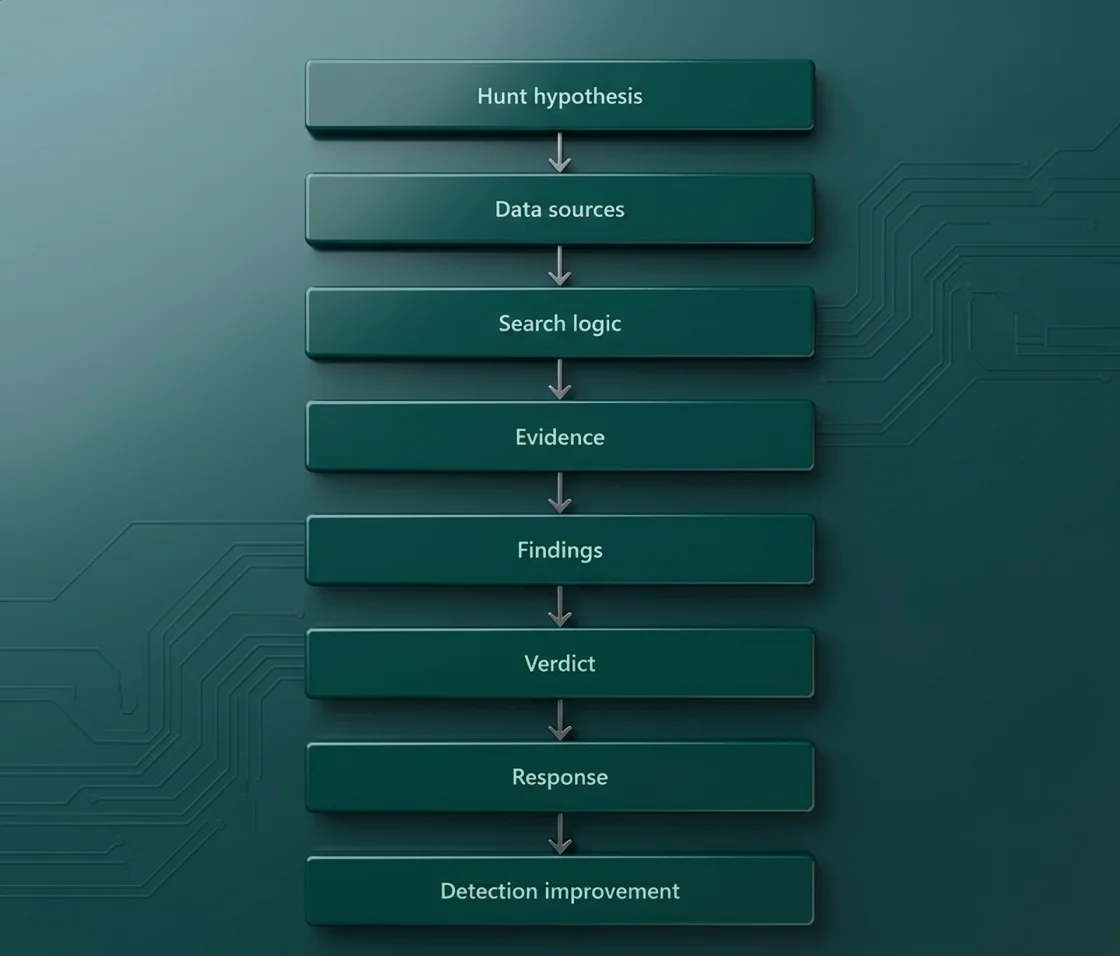
A useful hunt report should capture the hypothesis, trigger, data sources, investigation queries, findings, affected assets, evidence, conclusion, response actions, and detection improvements. A simple template can follow this structure:
Which Tools Do Threat Hunters Use?
Threat hunters use different tools at different stages of an investigation, from collecting raw telemetry to identifying anomalies and validating attacker activity. The main categories include:
- SIEM Platforms: Centralise logs from endpoints, networks, identities, applications, and cloud services, allowing hunters to correlate events and search across large datasets.
- EDR and XDR Solutions: Provide endpoint and cross-environment telemetry such as process execution, command lines, network connections, and user activity for investigating attacker behaviour.
- UEBA and Behavioural Analytics: Identify deviations from normal user, entity, or system behaviour, helping hunters investigate anomalies that may not trigger predefined rules.
- Threat Intelligence Platforms: Provide information on threat actors, campaigns, IOCs, and TTPs that hunters can use to form hypotheses and search for related activity.
- Open-Source Tooling: Sysmon, Sigma, YARA, and Zeek: Provide specialised telemetry and detection capabilities, including Windows event data, network visibility, portable detection rules, and file-pattern matching.
- MDR and Managed Threat Hunting Services: Provide analysts, specialised expertise, and continuous hunting capabilities for organisations that lack the resources or skills to maintain these functions internally.
What Are The Best Practices For Effective Threat Hunting?
Effective threat hunting depends on consistent investigation rather than occasional searches when an alert appears. Teams should understand their normal environment, focus hunts on relevant threats, turn useful findings into detections, and maintain the skills and resources needed to investigate complex activity. Here’s what to follow:
- Know Your Environment And Establish A Baseline: Understand normal users, devices, applications, network connections, and cloud activity. Without a baseline, hunters can struggle to distinguish genuine anomalies from routine behaviour.
- Schedule Hunting As Dedicated Work, Not Spare-Time Work: Assign specific time and ownership for hunts instead of treating them as an activity to perform after alert queues are cleared. This keeps proactive investigation from being consistently deprioritised.
- Operationalise Threat Intelligence Feeds: Do more than collect intelligence. Convert relevant IOCs and TTPs into hunt hypotheses, queries, and detection logic that can be tested against your own environment.
- Automate Every Successful Hunt: When a hunt repeatedly identifies a reliable malicious pattern, convert it into a detection rule or analytic. Automation allows hunters to focus on new and more complex behaviours.
- Skills That Define A Strong Threat Hunter: Effective hunters need skills across log analysis, endpoint investigation, networking, identity, cloud environments, scripting, threat intelligence, and attacker TTPs.
- Build In-House Vs Buy Managed Hunting: In-house hunting provides deeper knowledge of the organisation and its environment, while managed hunting provides access to specialised analysts and broader expertise. The choice should depend on internal skills, telemetry maturity, coverage requirements, and budget.
How Can Eventus Security Support Threat Hunting?
Threat hunting is not limited to looking for what is happening right now. When new threat intelligence emerges, security teams may also need to check whether related indicators were present in their environment earlier. Eventus Security supports this type of investigation through real-time IOC detection, retrospective scanning, IOC sweeping, and MITRE ATT&CK TTP mapping, giving security teams multiple ways to investigate known indicators and attacker behaviour.
Eventus’ Key Threat Hunting Capabilities:
- Real-Time IOC Detection: Eventus scans ingested security events against its threat intelligence database to identify known malicious indicators as activity occurs.
- Retrospective Threat Hunting: When new threat indicators emerge, Eventus can scan historical customer data for relevant IOCs, helping identify earlier evidence of compromise or related threat activity.
- MITRE ATT&CK TTP Mapping: Eventus uses MITRE ATT&CK mapping alongside threat intelligence to help security teams investigate attacker techniques and behaviours, rather than relying only on individual indicators.
- Managed Threat Hunting: Eventus Security Managed SOC services include proactive threat hunting, supported by IOC sweeping, MITRE ATT&CK TTP mapping, threat intelligence, and security analysts who investigate suspicious activity as part of ongoing security operations.
Book a demo with Eventus Security to see how its threat intelligence and security operations capabilities can support proactive threat hunting.
FAQs
1. Is threat hunting mandatory under CERT-In directions?
No. The CERT-In Directions of 28 April 2022 do not specifically make threat hunting a mandatory standalone activity. However, covered organisations must enable ICT system logs, securely retain them for 180 days, and comply with applicable incident reporting and response requirements.
2. Can a small company do threat hunting without a dedicated SOC?
Yes. A small company can start with focused hunts using available EDR, SIEM, identity, endpoint, and cloud logs. The priority should be high-risk accounts, critical systems, and relevant attacker techniques rather than trying to investigate the entire environment.
3. How often should a threat hunt be conducted?
Threat hunting should be performed regularly rather than only after an incident. The frequency can depend on the organisation's risk profile, threat landscape, available telemetry, and security resources, with additional hunts triggered by new vulnerabilities, threat intelligence, or suspicious activity.
4. What is the difference between IOC And IOA?
An IOC is an artefact associated with a potential compromise, such as a malicious IP address, domain, or file hash. An IOA focuses on the behaviour of an attacker, such as credential dumping, unusual privilege escalation, or suspicious PowerShell execution.